

Notification Settings
Organizing and Staying up to date with all the work-related information is necessary but customizing the receiving of notifications at your convenience is also important. This setting section helps in customizing the notification-receiving system conveniently.
There are different notification settings which are as follows:
EMAIL NOTIFICATIONS
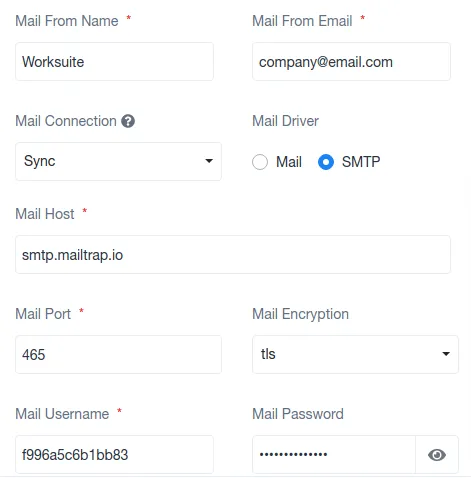
Section titled “EMAIL NOTIFICATIONS”This notification section allows the selection of the type of mailing network that one would preferably use for sending the information among their employees and clients.
It has options for either Mail or SMTP (Simple Mail Transfer Protocol),
SLACK NOTIFICATIONS
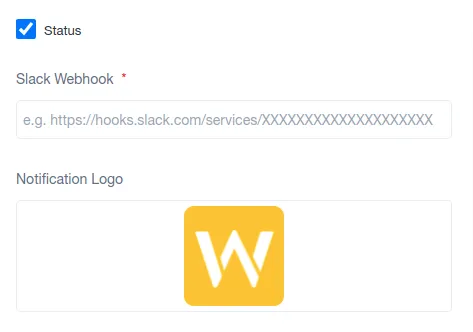
This notification settings section permits to feed in slack credentials and set their notification features depending on the organization.
PUSH NOTIFICATIONS
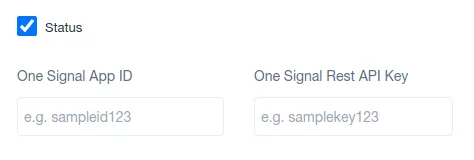
This notification settings section demands One Signal App ID and One Signal Rest API Key to set up the given section of settings.
PUSHER
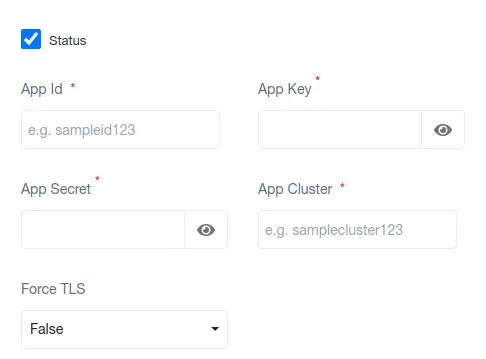
This notification settings section demands App ID, App Key, App Secret, App Cluster, and Force TLS to set up this section for the organization’s use.
document.querySelectorAll(‘.portal-attachment-thumbnail-img’).forEach(function(img) {
img.addEventListener(‘error’, function () {
attachment_error_image(this);
});
});
const attachment_error_image = (attachment) => {
const parentElement = attachment.parentElement;
const defaultIcon = <span class="icon-file-empty"></span><span class="fw-attachment-ext">${escapeHtml(attachment.dataset.extension)}</span>;
parentElement.innerHTML = defaultIcon;
};