

Creating Client
Creating a Client is necessary to add the new people who have joined as customers with the organization.
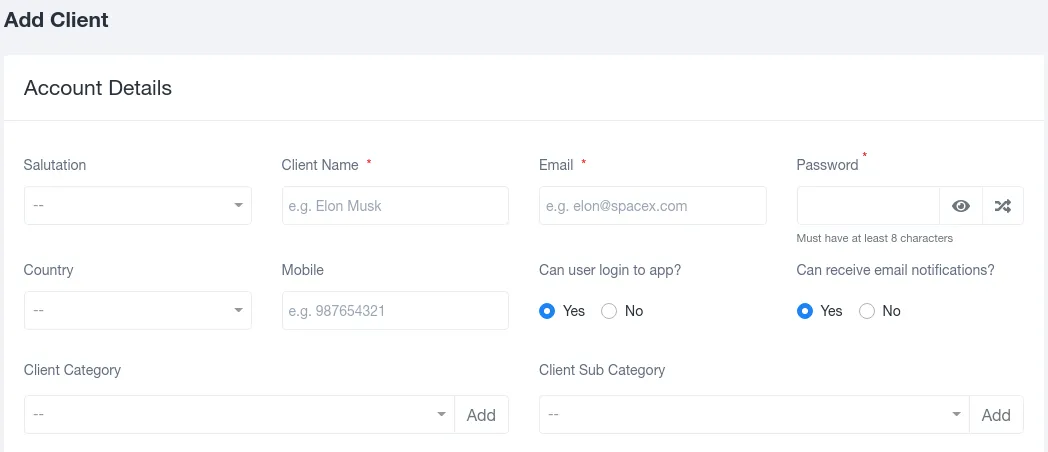
A client can be created by clicking on the “Add Client” option on the top left corner of the Clients module. Clicking on it will take you to a pre-generated form, once the details are added to it a new client is created.
The form asks for the following details:
1. **SALUTATION:**It allows to select the addressing salutation for individuals from Mr./ Mrs./ Ms.
2. **CLIENT NAME:**It takes the input of the name of the newly created member.
3. **EMAIL:**It requires email details for all sorts of communication.
4. **PASSWORD:**This allows individuals to access their accounts.
5. **COUNTRY:**This section tells where the individual belongs.
6. **MOBILE:**It requires an individual’s mobile number for communication.
7. CAN THE USER LOG IN TO THE APP?: Selecting Yes or No to this question allows the user to access the information in the application.
8. **CAN THE USER RECEIVE EMAIL NOTIFICATIONS?:**Selecting Yes or No to this question will decide whether the user will receive the notifications on their email or not.
9. **CLIENT CATEGORY:**The client category permits you to classify a specific client into the generally accepted genres by the company which is used for filtering the recorded list later while viewing.
10. CLIENT SUB-CATEGORY: The client sub-category allows further subdivision of the genre defined for the client so that proper segregation is done whenever required.
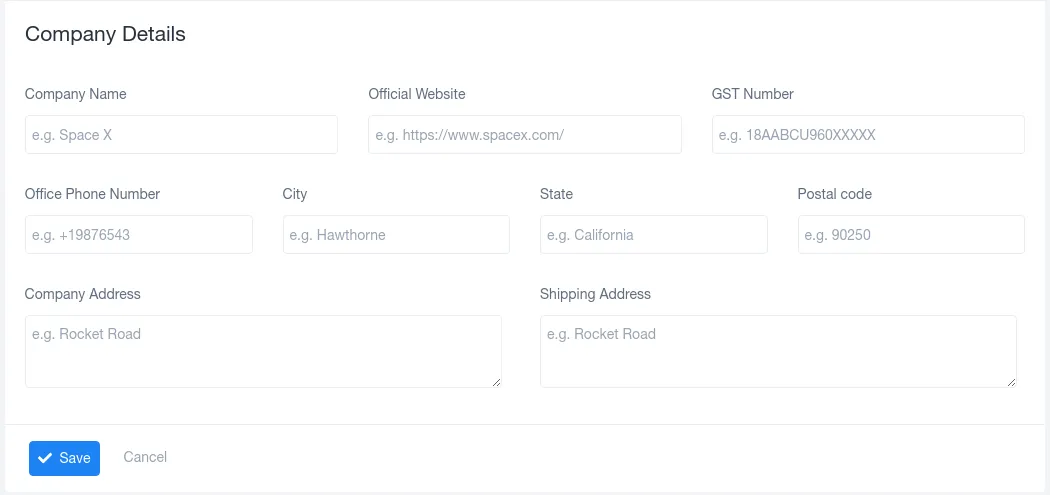
11. **COMPANY NAME:**For instance, when the client belongs to an organization or a company these details are required. So, this section records the data of the organization the work is being done for.
12. **OFFICIAL WEBSITE:**Records the link for the official website of the organization in case a brief overview is ever needed.
13. **GST NUMBER:**GST Number is required for any sort of payment procedure. Thus, to avoid future inconvenience, this detail is recorded beforehand.
14. OFFICE PHONE NUMBER: Phone numbers collected in the database for communication purposes.
15. **CITY:**It records the location (city) where the organization is based.
16. **STATE:**It records the location (state) where the organization is based.
17. **POSTAL CODE:**It records the detailed location by recording the postal code for the organization.
18. **COMPANY ADDRESS:**This is to collect the complete address for the company for any future reasons where it might be of some use to the recording organization.
19. **SHIPPING ADDRESS:**This collects the address so that any kind of delivery for documents or products can be done.
document.querySelectorAll(‘.portal-attachment-thumbnail-img’).forEach(function(img) {
img.addEventListener(‘error’, function () {
attachment_error_image(this);
});
});
const attachment_error_image = (attachment) => {
const parentElement = attachment.parentElement;
const defaultIcon = <span class="icon-file-empty"></span><span class="fw-attachment-ext">${escapeHtml(attachment.dataset.extension)}</span>;
parentElement.innerHTML = defaultIcon;
};