

Custom Labels for Products
Custom Labels for Products:
Section titled “Custom Labels for Products:”20 custom fields can be added for the product, these custom fields can be used while adding a new product.
Custom fields can be anything related to the product like brand code, product code etc.
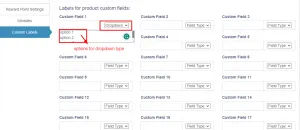
To add this Go to Settings > Business Settings > Custom labels
Provide the custom label name here.
Field Type for labels:
Section titled “Field Type for labels:”The data type can be specified for each custom field. Select text, date picker or dropdown types.
For dropdown add a line break after each option.
📩 Still stuck? Contact Support