

Project Import enhancement
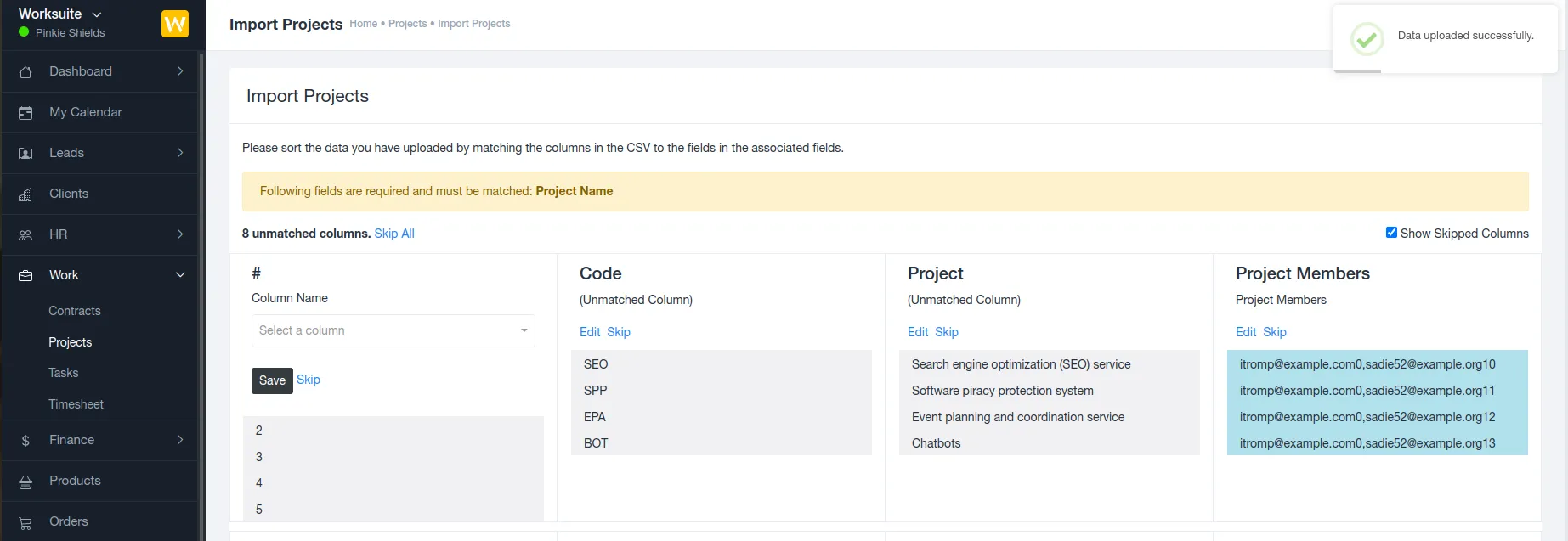
We’ve enhanced the Project Import functionality by adding support for importing project members . This update helps teams save time and ensures projects are fully set up immediately after import.
This feature will be released in the January 2026 update.
? What’s New?
Section titled “? What’s New?”A new option is now available in the Project Import process that allows you to include project members directly in the import file.
This means:
- Projects are created with assigned members from day one
- No need to manually add users after importing projects
- Faster and more accurate project setup
? How It Works
Section titled “? How It Works”- Prepare the project import file (CSV/Excel)
- Add the Project Members column
- Enter the relevant user emails eg: user1-email,user2-email,user3-email
- Upload the file using the Project Import option
Once the import is completed, the specified users are automatically added as members to their respective projects.
? Benefits
Section titled “? Benefits”- Eliminates manual post-import configuration
- Reduces setup time for large project migrations
- Ensures correct team assignments
- Improves project visibility and collaboration from the start
✅ Ideal Use Cases
Section titled “✅ Ideal Use Cases”- Migrating projects from another system
- Bulk project creation for multiple teams
- Onboarding new clients with pre-assigned teams
document.querySelectorAll(‘.portal-attachment-thumbnail-img’).forEach(function(img) {
img.addEventListener(‘error’, function () {
attachment_error_image(this);
});
});
const attachment_error_image = (attachment) => {
const parentElement = attachment.parentElement;
const defaultIcon = <span class="icon-file-empty"></span><span class="fw-attachment-ext">${escapeHtml(attachment.dataset.extension)}</span>;
parentElement.innerHTML = defaultIcon;
};