

Shipments, Home Delivery or parcel management
Adding a Delivery person option for Shipments
Section titled “Adding a Delivery person option for Shipments”While adding shipment details during a sale, the delivery person can also be added.
NOTE: This feature is available in OptiBiz POS version 5.2 and above
Adding Delivery Note for Sale
Section titled “Adding Delivery Note for Sale”How do we print the Delivery Receipt?
Section titled “How do we print the Delivery Receipt?”To add a delivery note, follow the steps below.
Step 1: While adding the sales, be sure to include shipping details (You can refer to the video guide provided below for assistance).
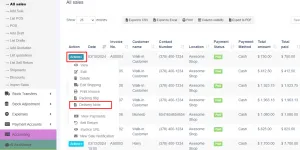
Step 2: Navigate to the All Sales screen and click on the Action dropdown menu for the specific sale added in Step 1.
Step 3: From the Action dropdown menu, select the ‘Delivery Note‘ option, and proceed to print the delivery note directly.
🎥 Video Demo for Shipments, Home Delivery or parcels
Section titled “🎥 Video Demo for Shipments, Home Delivery or parcels”📩 Still stuck? Contact Support