

Attendance Regularisation
The Attendance Regularisation feature allows employees to request corrections to their attendance records when they miss a punch, forget to clock in/out, or need adjustments. Admins and managers can control who can request changes, how often they can do so, and who is allowed to approve these requests.
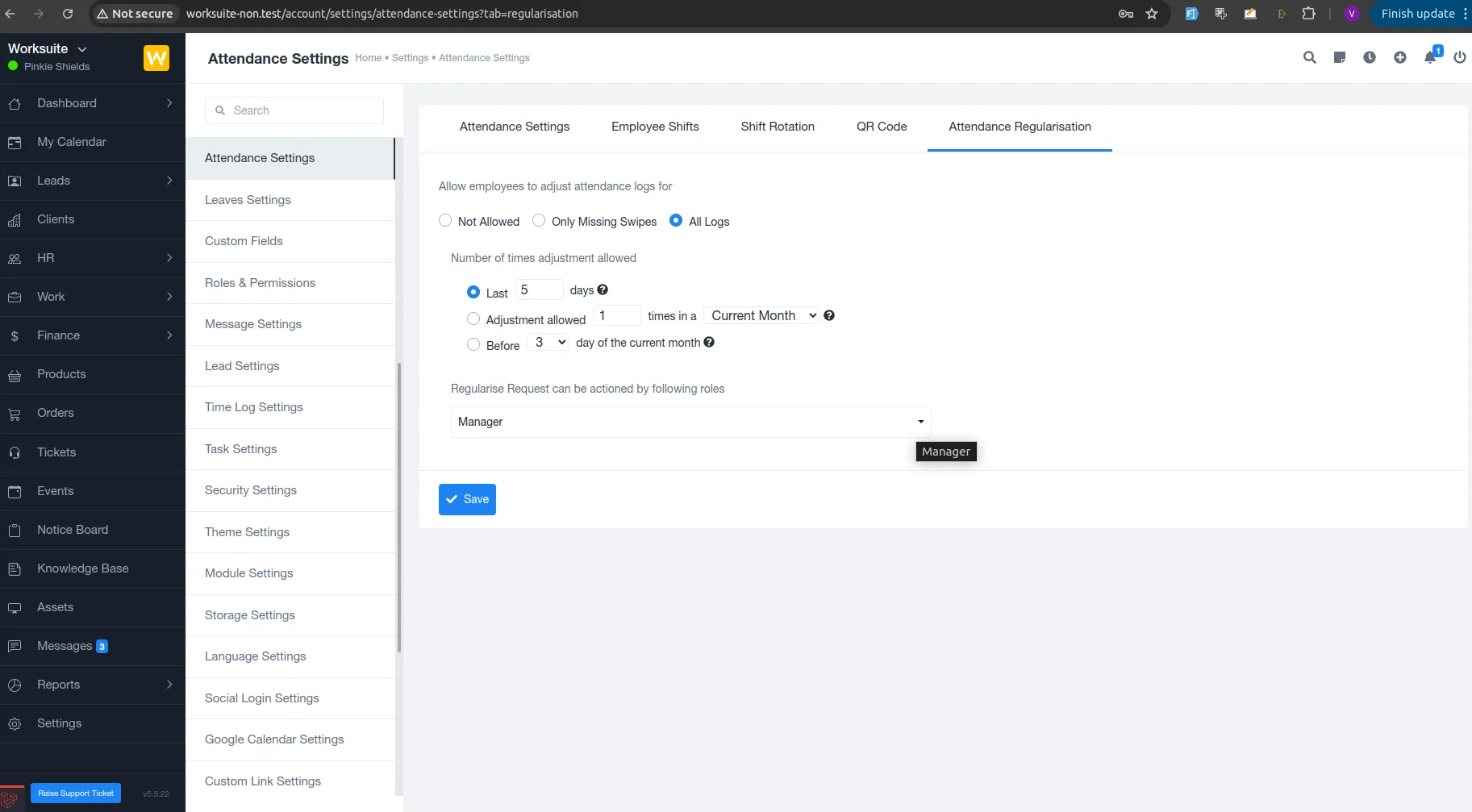
⚙️ Attendance Regularisation Settings (Admin)
Section titled “⚙️ Attendance Regularisation Settings (Admin)”Admins can configure attendance regularisation rules from:
Settings → Attendance Settings → Attendance Regularisation
? Configuration Options
Section titled “? Configuration Options”1️⃣ Allow Employees to Adjust Attendance Logs For
Section titled “1️⃣ Allow Employees to Adjust Attendance Logs For”Admins can choose one of the following:
- Not Allowed – Employees cannot request any corrections
- Only Missing Swipes – Employees can request corrections only for missed clock-in/clock-out
- All Logs – Employees can request changes for any attendance log
2️⃣ Number of Times Adjustment Allowed
Section titled “2️⃣ Number of Times Adjustment Allowed”Admins can limit how frequently employees can raise requests:
- Last X days (e.g., last 5 days)
- X times in a selected period (e.g., 1 time in the current month)
- Before X day of the current month (e.g., before the 3rd day)
This helps prevent misuse while still allowing genuine corrections.
3️⃣ Regularisation Approval Authority
Section titled “3️⃣ Regularisation Approval Authority”Select which roles can take action on requests:
- Manager
- Admin
- Other authorised roles
Only selected roles will be able to approve or reject regularisation requests.
? Employee View: Request Attendance Regularisation
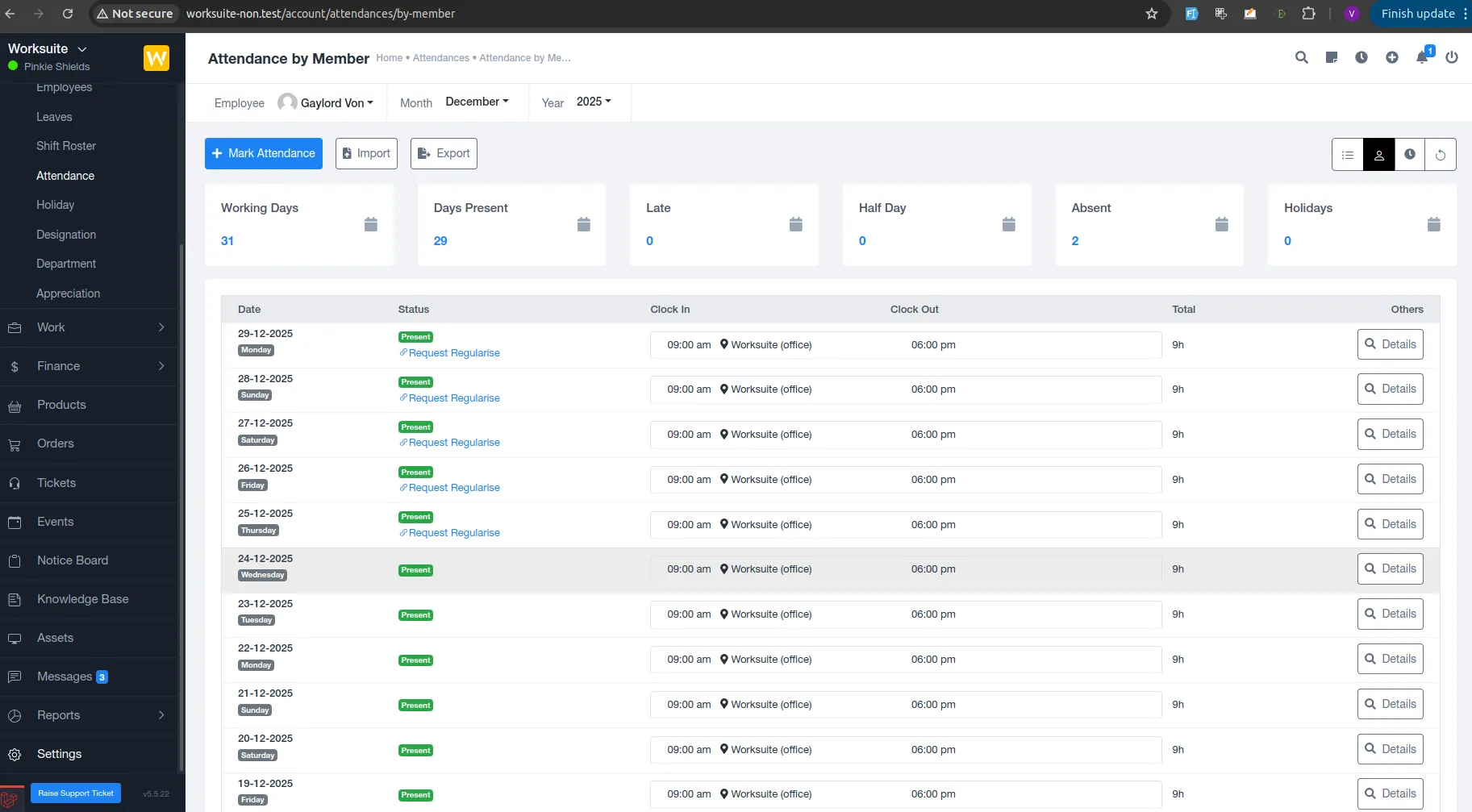
Section titled “? Employee View: Request Attendance Regularisation”Employees can request attendance corrections directly from their attendance records.
? Where to Raise a Request
Section titled “? Where to Raise a Request”HR → Attendance → Attendance by Member
? How It Works
Section titled “? How It Works”- Employee logs in
- Opens Attendance by Member
- Selects the relevant month and year
- Finds the attendance date
- Clicks “Request Regularise”
- Submits the request with required details
Each eligible attendance entry shows the Request Regularise option based on admin settings.
? Attendance Regularisation Requests (Admin/Manager)
Section titled “? Attendance Regularisation Requests (Admin/Manager)”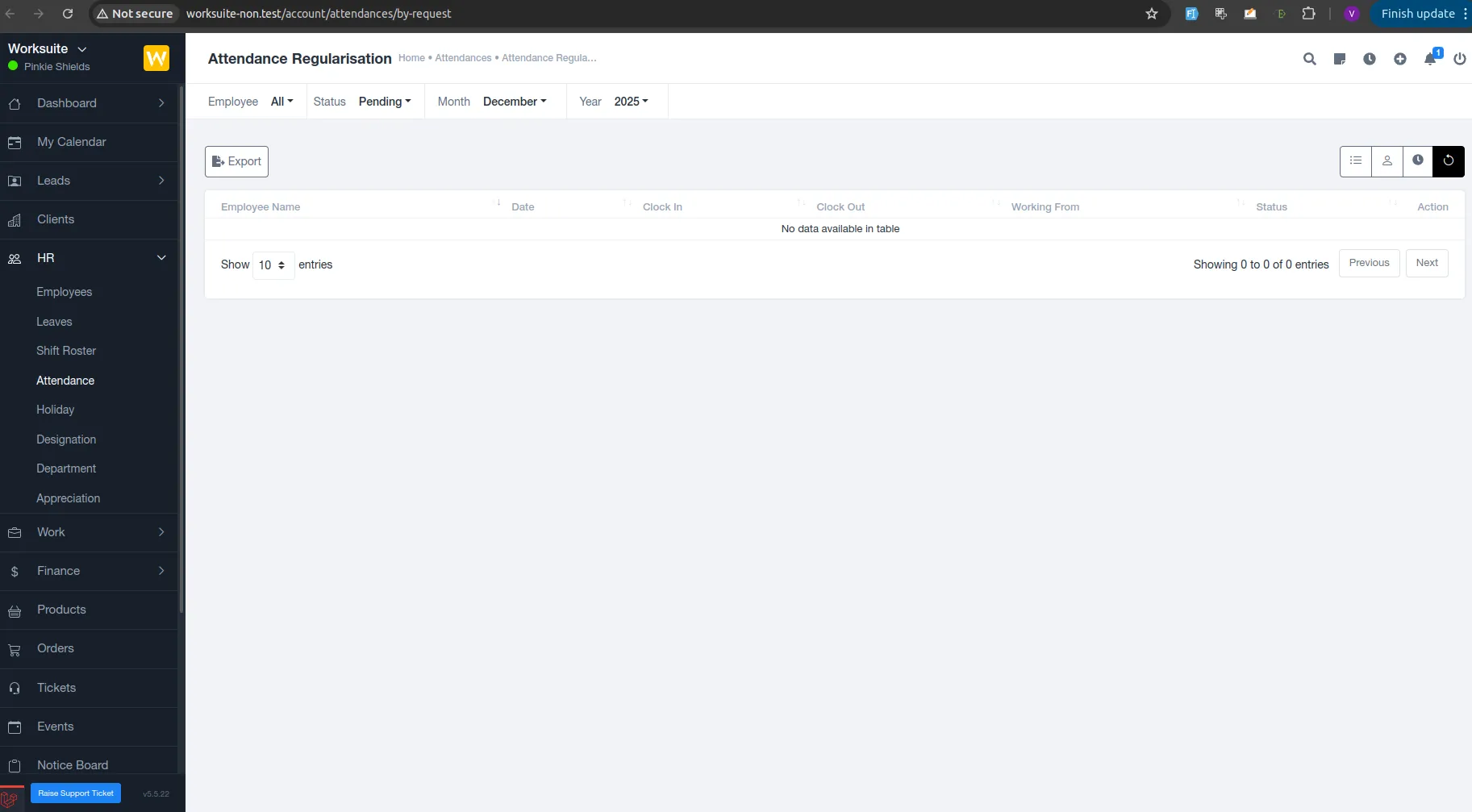
Admins and managers can review all requests from:
HR → Attendance → Attendance Regularisation
? Available Filters
Section titled “? Available Filters”- Employee
- Status (Pending / Approved / Rejected)
- Month
- Year
? Actions Available
Section titled “? Actions Available”- View request details
- Approve the request
- Reject the request
- Export records if required
Once actioned, the attendance record is updated accordingly.
? Status & Tracking
Section titled “? Status & Tracking”- Employees can track request status (Pending / Approved / Rejected)
- Managers get a centralised view of all regularisation requests
- Attendance records remain transparent and audit-able
? Benefits of Attendance Regularisation
Section titled “? Benefits of Attendance Regularisation”- Reduces manual HR intervention
- Prevents attendance disputes
- Maintains audit-friendly attendance records
- Empowers employees with controlled self-service
- Ensures approval-based corrections
document.querySelectorAll(‘.portal-attachment-thumbnail-img’).forEach(function(img) {
img.addEventListener(‘error’, function () {
attachment_error_image(this);
});
});
const attachment_error_image = (attachment) => {
const parentElement = attachment.parentElement;
const defaultIcon = <span class="icon-file-empty"></span><span class="fw-attachment-ext">${escapeHtml(attachment.dataset.extension)}</span>;
parentElement.innerHTML = defaultIcon;
};